
Article
What are AI automations?
Who is this article for?
Employees and managers who keep hearing the term “AI automations” and want to understand what it means.
What is the purpose of this article?
To explain in plain language what AI automations are, what they make possible, and when and how to use them at work.
Let's start with two simple definitions
What is automation?
Automation means making a process, or part of it, run automatically so that a person doesn't have to carry out every action themselves.
For example, a customer fills in a form on your website, their details are added to your customer management system and they receive a confirmation message. Someone set up the process in advance, and from then on it runs whenever a form is submitted. An employee no longer needs to copy the details or send the message manually.
An automation can carry out a whole sequence of actions, or stop at a point where a person needs to review something or make a decision.
What are AI systems?
Artificial intelligence is a broad field. In this article, we'll focus on systems that can process and understand human language, interpret requests and information, draw conclusions, create content and choose actions based on context and instructions.
When we say a system “understands”, we mean that it can interpret information and respond usefully. That ability doesn't guarantee that its interpretation or answer will be correct every time.
What limited automations for many years?
Traditional automations work well when the rules are clear: if a particular thing happens, take a particular action. If a customer selects “Sales” on a form, the enquiry goes to sales. If they select “Support”, it goes to support. But what happens when the customer writes a message in their own words?
“I bought a machine from you a month ago. It keeps stopping halfway through a job again, and I need someone to get back to me today.”
To handle this message, you need to recognise a fault, understand that it is probably a recurring problem and notice the request for urgent attention. A system based only on rules could look for words such as “fault” or “urgent”. But neither word appears in our example. As you add more possible phrases and scenarios, the rules become more complex, and there will still be cases you haven't anticipated.
Systems that classified text and recognised patterns existed before the current wave of AI. But for many businesses, handling free-form language and changing information flexibly required specialised solutions and considerable effort.
What does AI change about automation?
AI lets you add a step that interprets information without a fixed format: a message, a document, a call transcript or a request phrased in an unfamiliar way.
Alongside using a customer's form selection or keywords, you can ask the system to identify the purpose of the enquiry, extract important details and suggest the next step.
In the machine example, a workflow could be designed to:
- Recognise a service enquiry about a recurring fault.
- Find the customer's details and enquiry history.
- Prepare a short summary for the service team.
- Create a ticket in the system and flag it for an urgency review.
- Draft a reply and pass it to an employee for approval.
Accessing information and taking these actions requires appropriate connections to your business systems and permissions set in advance. Using AI doesn't automatically give it that access.
An AI automation is an automated process that uses AI capabilities in one or more of its stages. Some actions may be entirely conventional, such as saving details in a system, while others involve interpreting information or creating content.
This opens up possibilities for automating tasks that were previously harder to automate: sorting enquiries by their content, comparing documents written in different ways, preparing drafts tailored to a customer or turning meeting notes into a task list.
Can you trust AI automations?
They can be useful when their checks and level of independence are designed to suit the task.
An error in tagging an internal document has different consequences from an error in a quote sent to a customer or a decision affecting safety. The more serious the consequences of an error, the more thorough the checks and oversight need to be.
Before putting a workflow into use, test it on real examples, including unusual cases: missing information, unclear requests, conflicting documents and situations where the system doesn't have an adequate answer. You also need to define when it should stop and hand over to a person.
For business processes where an error could put lives at risk, my recommendation is for a qualified person to review every result before it is used to make a decision or take action. Even that review cannot guarantee zero errors or replace a professional assessment of whether the system is suitable for the task.
Human review can still leave plenty of room to save time
Suppose an employee needs to read several documents, find specific details and prepare a draft report. An automation can prepare the draft and identify the source of each detail, leaving the employee to check and correct it.
The review still takes work, but the employee receives organised material they can assess. The actual time saving needs to be measured, including the time spent checking and correcting the output.
You can also add automated checks between stages: confirm that required fields are present, compare amounts with the source system or run an additional AI check for discrepancies between an original document and its summary.
These checks can improve quality, but a second AI check may miss the same error. It helps to combine them with checks against source information and clear rules, and test whether they actually catch mistakes. Anthropic's guidance on building these systems also emphasises testing, feedback and human checkpoints. Read more
AI automation and AI-assisted workflows
In my work, I distinguish between two ways of using AI in business processes. This is a practical distinction that helps decide how to divide the work between the employee and the system.
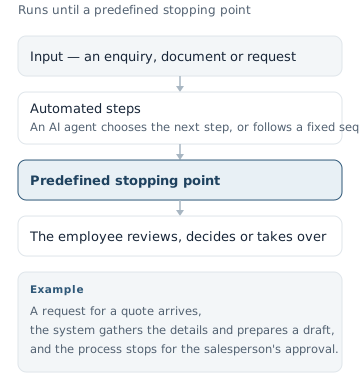
AI automation
A part of a process runs independently until it reaches a predefined point where an employee reviews, decides or takes over. Sometimes this is carried out by an AI agent: a system that uses AI and the tools available to it to perform several actions towards a goal. Simpler automations can also follow a fixed sequence, without an agent choosing the next step.
For example, a request for a quote arrives, the system gathers the relevant details and prepares a draft, then stops for approval from a salesperson.
An AI-assisted workflow
A workflow in which the employee and AI work together throughout. The employee sets the direction, contributes knowledge, considers alternatives and makes decisions. The system helps gather information, analyse, draft and carry out actions.
This work can take place through desktop applications such as ChatGPT or Claude, following a defined process and using appropriate connections to the organisation's information and systems. Using an application installed on your computer doesn't necessarily mean the information is processed on that computer.
For example, a sales manager preparing a complex proposal uses AI to summarise the customer's needs, explores alternatives with it, chooses a direction and asks it to prepare a draft accordingly.
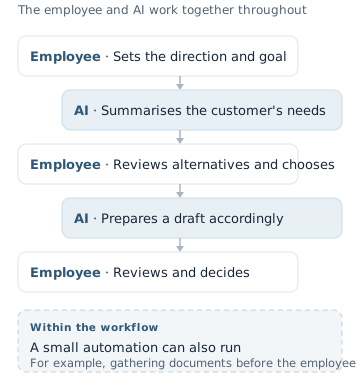
An AI-assisted workflow can contain smaller parts that run as independent automations. An employee can start an automated document-gathering process, receive the results and continue working with AI. A task that requires human experience and judgment can therefore still benefit from AI in some of its stages.
Examples of AI automations in a business
The following examples illustrate workflows you could design, depending on the information and systems available in your business.
Sorting enquiries and routing them to the right person
The system reads an enquiry, identifies its subject, prepares a summary and routes it to the appropriate department. Unclear enquiries are passed to a person for classification.
Preparing meeting summaries and tasks
Using a meeting transcript, the system prepares a summary and extracts the tasks, responsible people and deadlines that were mentioned. An employee checks the result before sharing it, and details that weren't stated are marked as missing.
Preparing a draft quote
The system extracts the request, finds items in an approved price list and prepares a draft. A salesperson checks suitability, prices and commitments before sending it.
Processing documents and transferring data
The system reads documents in different formats, extracts the required details and prepares them for entry into another system. Missing or conflicting information is passed for review.
Preparing replies to service enquiries
The system finds information in the business's knowledge base and prepares a reply addressing the customer's question. You can start by approving every response, then assess whether specific types of enquiry are suitable for independent replies.
How do you find workflows suited to AI automation?
Start by talking to the people who do the work. They know where time goes, what repeats and where things get stuck.
As I also explain on the AI agents and workflows service page, it helps to break a large process into smaller actions and consider where AI could contribute.
For example, “preparing a quote” includes reading the enquiry, clarifying details, choosing a solution, checking prices, drafting and approval. Choosing the solution might remain with the employee, while gathering information and preparing the draft could be automated.
To choose your first task, work through these steps:
01Find repetitive or time-consuming work
Look for reading, copying, summarising, searching and document preparation. A task doesn't have to happen every day to be suitable if it takes significant effort.
02Break it into stages
Write down what information comes in, what happens to it, which decisions are made and what needs to come out at the end.
03Identify where AI is needed
Moving a field between two systems can be handled by conventional automation. Interpreting a free-form request or summarising a document may justify using AI.
04Define what a good result looks like
What must be included? What must stay unchanged? How will the employee check that the task was completed correctly?
05Check information availability and the consequences of errors
Does the required information exist, and is it accessible with appropriate permission? What happens if the result is wrong, and who can spot and correct it?
06Choose a small trial and measure the results
Start with a defined stage and human oversight. Measure working time, quality, the number of corrections and running costs before expanding.
A good starting task has clear inputs, a result that is easy to check and an employee who knows it well. Ask that person to bring a few real examples and walk through how they handle them today. This helps identify exactly what the system should do and where the employee's experience adds the most value.